操作过程
1. 在drawable中新建一个button_circle_shape.xml
但是建立这个xml是有操作的,因为从drawable右键是创建不了xml的, 具体操作如下:
右键res–>New–>Android resourse file
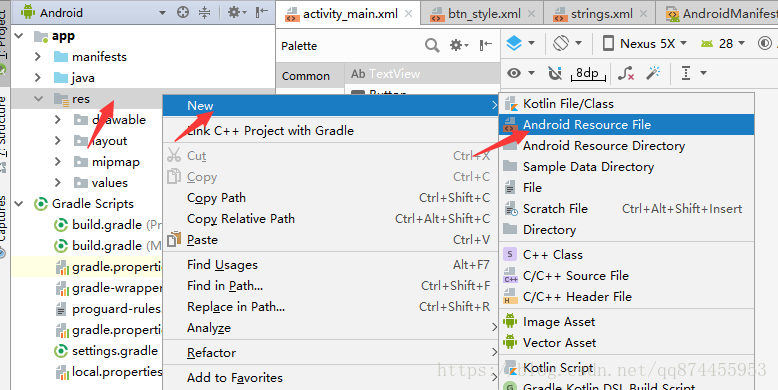
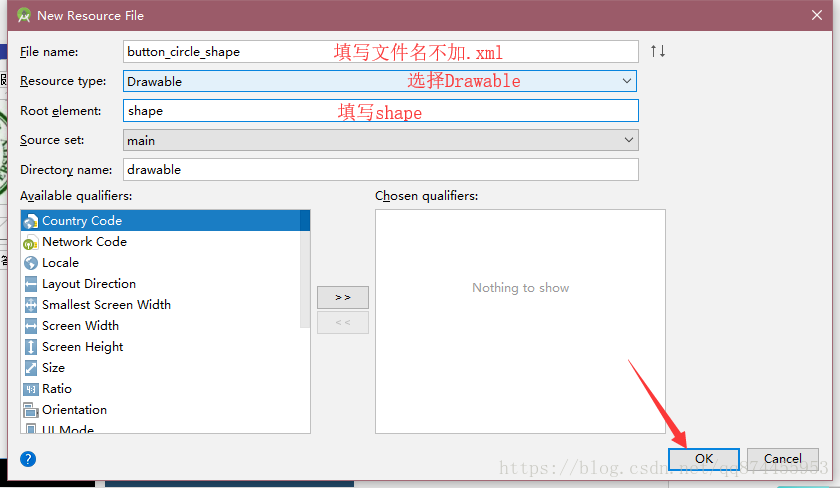
注意Root element 是不能选择的 是直接填写为shape, 默认应该是selector 把它改为shape即可
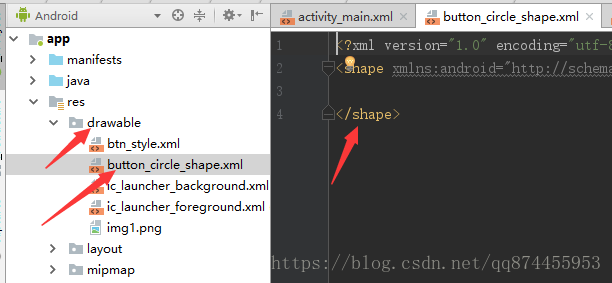
然后就可以看见在drawable 成功添加了xml
2.填写代码
button_circle_shape.xml 内容如下
这个xml里有一个shape,此shape规定了圆角按钮的样式
xmlns:android="http://schemas.android.com/apk/res/android"
android:shape="rectangle">
android:radius="5dip" />
**设置文字padding**
android:left="10dp"
android:top="10dp"
android:right="10dp"
android:bottom="10dp"
/>
3.使用shape:
给button的background属性赋值为刚创建的
android:background="@drawable/button_circle_shape"
最后
以上就是知性钢笔最近收集整理的关于android studio弧形滑动按钮,android studio实现圆角的button的全部内容,更多相关android内容请搜索靠谱客的其他文章。
本图文内容来源于网友提供,作为学习参考使用,或来自网络收集整理,版权属于原作者所有。








发表评论 取消回复