我的解决方法:
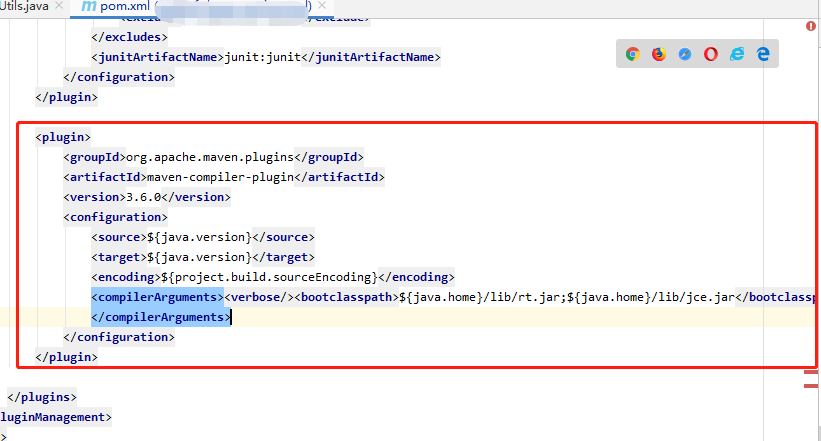
这段复制贴进报错项目模块的pom.xml文件对应的插件配置区域中
<plugin>
   <groupId>org.apache.maven.plugins</groupId>
   <artifactId>maven-compiler-plugin</artifactId>
   <version>3.6.0</version>
   <configuration>
      <source>${java.version}</source>
      <target>${java.version}</target>
      <encoding>${project.build.sourceEncoding}</encoding>
      <compilerArguments><verbose/><bootclasspath>${java.home}/lib/rt.jar;${java.home}/lib/jce.jar</bootclasspath>
      </compilerArguments>
   </configuration>
</plugin>
————————————————————————————————————————————————亲测好用-----------(我用上面的方法就好用了)
下面是网上网友写的参考方法,
错误截图:
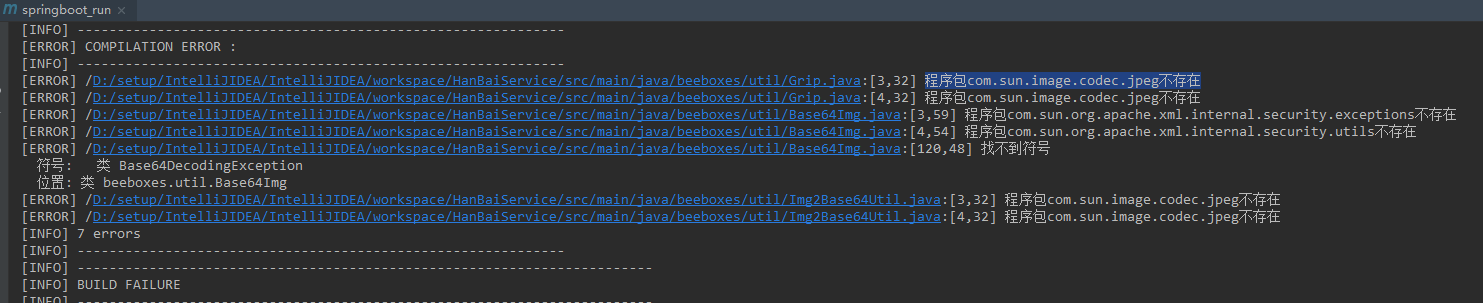
解决方法:在pom.xml文件中间加上以下代码:
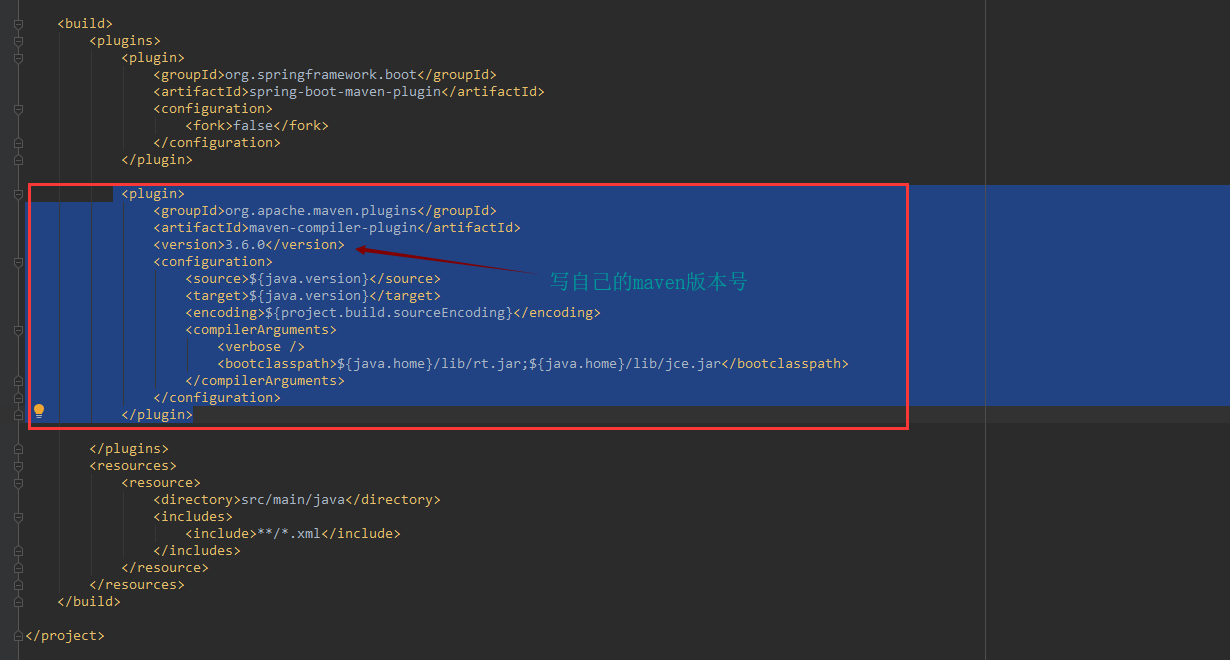
代码:
| 1 2 3 4 5 6 7 8 9 10 11 12 13 14 |
|
————————————————————————————————————————
看了另一个帖子
程序包com.sun.image.codec.jpeg不存在 的几种解决方案和遇到的坑
maven打包出现XXXX.java:[3,32] 程序包com.sun.image.codec.jpeg不存在
总结一下有几种解决方案:
1.不用jpeg这个类:
-
ByteArrayOutputStream out = null; -
byte[] b = null; -
try { -
BufferedImage bi = ImageIO.read(is); -
Image Itemp = bi.getScaledInstance(wdith, height, BufferedImage.SCALE_SMOOTH); -
BufferedImage thumbnail = new BufferedImage(wdith, height, BufferedImage.TYPE_INT_RGB); -
thumbnail.getGraphics().drawImage(Itemp, 0, 0, null); -
out = new ByteArrayOutputStream(); -
// 绘图 -
JPEGImageEncoder encoder = JPEGCodec.createJPEGEncoder(out); -
JPEGEncodeParam param = encoder.getDefaultJPEGEncodeParam(thumbnail); -
param.setQuality(1.0f, false); -
encoder.encode(thumbnail); -
out.flush(); -
b = out.toByteArray(); -
out.close(); -
bi.flush(); -
bi = null; -
} catch (IOException e) { -
logger.error(Util.stackTrace2String(e)); -
}finally{ -
if(out != null){ -
try { -
out.close(); -
} catch (IOException e) { -
e.printStackTrace(); -
} -
} -
}
2.想办法打包的时候包含进rt.jar
比如利用maven-compiler-plugin里面的bootclasspath:
-
<plugin> -
<artifactId>maven-compiler-plugin</artifactId> -
<version>2.3.2</version> -
<configuration> -
<source>1.6</source> -
<target>1.6</target> -
<encoding>UTF-8</encoding> -
<optimize>true</optimize> -
<debug>true</debug> -
<showDeprecation>true</showDeprecation> -
<showWarnings>false</showWarnings> -
<compilerArguments> -
<verbose /> -
<bootclasspath>${java.home}/lib/rt.jar;${java.home}/lib/jce.jar</bootclasspath> -
</compilerArguments> -
</configuration> -
</plugin>
3.打包的时候包含rt.jar的文件夹:
-
<plugin> -
<groupId>org.apache.maven.plugins</groupId> -
<artifactId>maven-compiler-plugin</artifactId> -
<version>3.3</version> -
<configuration> -
<source>1.7</source> -
<target>1.7</target> -
<encoding>utf8</encoding> -
<compilerArguments> -
<extdirs>${env.JAVA_HOME}/jre/lib</extdirs> -
</compilerArguments> -
</configuration> -
</plugin>
4.你也可以把rt.jar放到webapp/WEB-INF/lib路径下面,然后就只要:
-
<plugin> -
<groupId>org.apache.maven.plugins</groupId> -
<artifactId>maven-compiler-plugin</artifactId> -
<version>3.3</version> -
<configuration> -
<source>1.7</source> -
<target>1.7</target> -
<encoding>utf8</encoding> -
<compilerArguments> -
<extdirs>${basedir}/src/main/webapp/WEB-INF/lib</extdirs> -
</compilerArguments> -
</configuration> -
</plugin>
5.遇到的坑:
A.<bootclasspath><extdirs>两个标签,如果配置多个数据,mac,linux用冒号(:),而windows用分号(;)
B.<bootclasspath><extdirs>两个标签,windows路径用,mac,linux用/
最后
以上就是畅快绿草最近收集整理的关于IDEA maven项目报错:程序包com.sun.image.codec.jpeg不存在 我的解决方法:下面是网上网友写的参考方法,程序包com.sun.image.codec.jpeg不存在 的几种解决方案和遇到的坑maven打包出现XXXX.java:[3,32] 程序包com.sun.image.codec.jpeg不存在1.不用jpeg这个类:2.想办法打包的时候包含进rt.jar3.打包的时候包含rt.jar的文件夹:4.你也可以把rt.jar放到webapp/WEB-INF/lib的全部内容,更多相关IDEA内容请搜索靠谱客的其他文章。




![IDEA maven项目报错:程序包com.sun.image.codec.jpeg不存在 我的解决方法:下面是网上网友写的参考方法,程序包com.sun.image.codec.jpeg不存在 的几种解决方案和遇到的坑maven打包出现XXXX.java:[3,32] 程序包com.sun.image.codec.jpeg不存在1.不用jpeg这个类:2.想办法打包的时候包含进rt.jar3.打包的时候包含rt.jar的文件夹:4.你也可以把rt.jar放到webapp/WEB-INF/lib](https://www.shuijiaxian.com/files_image/reation/bcimg15.png)



发表评论 取消回复