通过关键字
1.
print('{name}在{option}'.format(name="谢某人",option="写代码"))结果:谢某人在写代码
通过位置
1.
print('name={} path={}'.format('zhangsan', '/')结果:name=zhangsan path=/
2.
print('{1}在{0}'.format('写代码','谢某人'))3.
print('{0}在{1}'.format('谢某人','写代码'))结果:谢某人在写代码
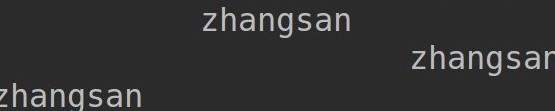
填充和对齐^<>分别表示居中、左对齐、右对齐,后面带宽度
-
print('{:^30}'.format("zhangsan")) # 居中 -
print('{:>30}'.format("zhangsan")) # 右对齐 -
print('{:<30}'.format("zhangsan")) # 左对齐 -
30:字段长度(最左到最右之间的长度)
精度控制 :.nf
1.
print('{:.2f}'.format(3.14159))-
结果:3.14 -
保留两位小数,两位后四舍五入
2.
print('{:.5f}'.format(3.14))-
结果:3.14000 -
保留5位小数,不足补0.
进制转化,b o d x 分别表示二、八、十、十六进制
-
print('{:b}'.format(20)) -
print('{:o}'.format(20)) -
print('{:d}'.format(20)) -
print('{:x}'.format(20))
结果:
10100
24
20
14
千位分隔符::,
-
print('{:,}'.format(100000000)) -
print('{:,}'.format(123456.123456))
结果:
100,000,000
123,456.123456
最后
以上就是超级机器猫最近收集整理的关于python中format函数的全部内容,更多相关python中format函数内容请搜索靠谱客的其他文章。
本图文内容来源于网友提供,作为学习参考使用,或来自网络收集整理,版权属于原作者所有。








发表评论 取消回复