QT无边框可拖动缩放窗口 MainWindow ,添加标题菜单,子控件
ui文件
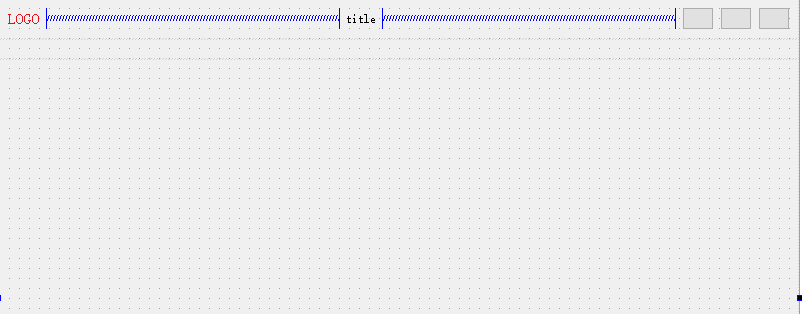
<?xml version="1.0" encoding="UTF-8"?>
<ui version="4.0">
 <class>mainWindow</class>
 <widget class="QWidget" name="mainWindow">
  <property name="geometry">
   <rect>
    <x>0</x>
    <y>0</y>
    <width>800</width>
    <height>600</height>
   </rect>
  </property>
  <property name="windowTitle">
   <string>Widget</string>
  </property>
  <layout class="QVBoxLayout" name="verticalLayout" stretch="5,0,100">
   <property name="spacing">
    <number>0</number>
   </property>
   <property name="leftMargin">
    <number>0</number>
   </property>
   <property name="topMargin">
    <number>0</number>
   </property>
   <property name="rightMargin">
    <number>0</number>
   </property>
   <property name="bottomMargin">
    <number>0</number>
   </property>
   <item>
    <widget class="QWidget" name="titleWidget" native="true">
     <property name="sizePolicy">
      <sizepolicy hsizetype="Preferred" vsizetype="Expanding">
       <horstretch>0</horstretch>
       <verstretch>0</verstretch>
      </sizepolicy>
     </property>
     <layout class="QHBoxLayout" name="horizontalLayout">
      <item>
       <widget class="QLabel" name="logoLb">
        <property name="styleSheet">
         <string notr="true">color: rgb(224, 18, 27);
font-size: 15px;
width: 108px;
height: 18px;</string>
        </property>
        <property name="text">
         <string>LOGO</string>
        </property>
       </widget>
      </item>
      <item>
       <spacer name="horizontalSpacer">
        <property name="orientation">
         <enum>Qt::Horizontal</enum>
        </property>
        <property name="sizeHint" stdset="0">
         <size>
          <width>40</width>
          <height>20</height>
         </size>
        </property>
       </spacer>
      </item>
      <item>
       <widget class="QLabel" name="titleLb">
        <property name="styleSheet">
         <string notr="true"/>
        </property>
        <property name="text">
         <string>title</string>
        </property>
       </widget>
      </item>
      <item>
       <spacer name="horizontalSpacer_2">
        <property name="orientation">
         <enum>Qt::Horizontal</enum>
        </property>
        <property name="sizeHint" stdset="0">
         <size>
          <width>40</width>
          <height>20</height>
         </size>
        </property>
       </spacer>
      </item>
      <item>
       <widget class="QPushButton" name="minBtn">
        <property name="text">
         <string/>
        </property>
       </widget>
      </item>
      <item>
       <widget class="QPushButton" name="maxBtn">
        <property name="text">
         <string/>
        </property>
        <property name="checkable">
         <bool>true</bool>
        </property>
        <property name="checked">
         <bool>false</bool>
        </property>
       </widget>
      </item>
      <item>
       <widget class="QPushButton" name="closeBtn">
        <property name="text">
         <string/>
        </property>
       </widget>
      </item>
     </layout>
    </widget>
   </item>
   <item>
    <widget class="QWidget" name="menuBar" native="true">
     <property name="sizePolicy">
      <sizepolicy hsizetype="Preferred" vsizetype="MinimumExpanding">
       <horstretch>0</horstretch>
       <verstretch>0</verstretch>
      </sizepolicy>
     </property>
     <property name="minimumSize">
      <size>
       <width>0</width>
       <height>20</height>
      </size>
     </property>
     <property name="baseSize">
      <size>
       <width>0</width>
       <height>20</height>
      </size>
     </property>
     <layout class="QHBoxLayout" name="mblo">
      <property name="spacing">
       <number>2</number>
      </property>
      <property name="leftMargin">
       <number>1</number>
      </property>
      <property name="topMargin">
       <number>1</number>
      </property>
      <property name="rightMargin">
       <number>1</number>
      </property>
      <property name="bottomMargin">
       <number>1</number>
      </property>
     </layout>
    </widget>
   </item>
   <item>
    <widget class="QWidget" name="mapView" native="true"/>
   </item>
  </layout>
  <action name="openCanAction">
   <property name="text">
    <string>openCan</string>
   </property>
   <property name="toolTip">
    <string>openCan</string>
   </property>
  </action>
  <action name="closeCanAction">
   <property name="text">
    <string>closeCan</string>
   </property>
   <property name="toolTip">
    <string>closeCan</string>
   </property>
  </action>
  <action name="quitAction">
   <property name="text">
    <string>quit</string>
   </property>
   <property name="toolTip">
    <string>quit</string>
   </property>
  </action>
  <action name="dataFilterAction">
   <property name="text">
    <string>dataFilter</string>
   </property>
   <property name="toolTip">
    <string>dataFilter</string>
   </property>
  </action>
  <action name="showListAction">
   <property name="text">
    <string>showList</string>
   </property>
   <property name="toolTip">
    <string>showList</string>
   </property>
  </action>
  <action name="radarCfgAction">
   <property name="text">
    <string>radarCfg</string>
   </property>
   <property name="toolTip">
    <string>radarCfg</string>
   </property>
  </action>
  <action name="flashToolAction">
   <property name="text">
    <string>flashTool</string>
   </property>
   <property name="toolTip">
    <string>flashTool</string>
   </property>
  </action>
  <action name="mapCfgAction">
   <property name="text">
    <string>mapCfg</string>
   </property>
   <property name="toolTip">
    <string>mapCfg</string>
   </property>
  </action>
  <action name="aboutAction">
   <property name="text">
    <string>about</string>
   </property>
   <property name="toolTip">
    <string>about</string>
   </property>
  </action>
 </widget>
 <resources/>
 <connections/>
</ui>
mainwindow.h
#ifndef MAINWINDOW_H
#define MAINWINDOW_H

#include <QObject>

#include "framelesswidget.h"


namespace Ui {
    class mainWindow;
}

class MainWindow : public FramelessWidget
{
    Q_OBJECT
public:
    explicit MainWindow(QWidget*parent=nullptr);
    ~MainWindow();


protected:

private slots:
    void on_minBtn_clicked();

    void on_maxBtn_clicked(bool checked);

    void on_closeBtn_clicked();

private:
    void setupUI();

private:
    Ui::mainWindow *ui;
};

#endif // MAINWINDOW_H
mainwindow.cpp
#include "mainwindow.h"
#include "ui_mainwindow.h"
#include <QMenuBar>
#include <QMenu>
#include <QDebug>

MainWindow::MainWindow(QWidget*parent):FramelessWidget(parent)
    ,ui(new Ui::mainWindow)
{
    ui->setupUi(this);
    setupUI();

    //关键所有QWidget子控件开启鼠标追踪
    auto listwidget = this->findChildren<QWidget*>(QString(),Qt::FindDirectChildrenOnly);
    foreach(auto item, listwidget)
    {
        qDebug()<<__FUNCTION__<<item->objectName();
        item->setMouseTracking(true);
    }
}

MainWindow::~MainWindow()
{
    delete ui;
}

void MainWindow::on_minBtn_clicked()
{
    this->showMinimized();
}

void MainWindow::on_maxBtn_clicked(bool checked)
{
    if(checked)
    {
        this->showMaximized();
    }else{
        this->showNormal();
    }
}

void MainWindow::on_closeBtn_clicked()
{
    qApp->quit();
}

void MainWindow::setupUI()
{
    //logo
    ui->logoLb->setText("logo");
    //title
    ui->titleLb->setText("title");
    //menus
    QMenu *startMenu = new QMenu("start",this);
    startMenu->setMinimumSize(60,20);

    startMenu->addAction(ui->openCanAction);
    startMenu->addAction(ui->closeCanAction);

    QMenu *dataMenu = new QMenu("data",this);
    dataMenu->setMinimumSize(60,20);
    dataMenu->addAction(ui->dataFilterAction);
    dataMenu->addAction(ui->showListAction);

    QMenu *toolMenu = new QMenu("tool",this);
    toolMenu->setMinimumSize(60,20);
    toolMenu->addAction(ui->radarCfgAction);
    toolMenu->addAction(ui->flashToolAction);
    toolMenu->addAction(ui->mapCfgAction);

    QMenu *helpMenu = new QMenu("help",this);
    helpMenu->setMinimumSize(60,20);
    helpMenu->addAction(ui->aboutAction);

    //menubar
    QMenuBar *mb = new QMenuBar(this);
    mb->addMenu(startMenu);
    mb->addMenu(dataMenu);
    mb->addMenu(toolMenu);
    mb->addMenu(helpMenu);

    ui->mblo->addWidget(mb);
}
最关键代码 所有QWidget子控件开启鼠标追踪
不然的话,基类 FramelessWidget ,被子控件遮挡,鼠标事件不响应
    //关键所有QWidget子控件开启鼠标追踪
    auto listwidget = this->findChildren<QWidget*>(QString(),Qt::FindDirectChildrenOnly);
    foreach(auto item, listwidget)
    {
        qDebug()<<__FUNCTION__<<item->objectName();
        item->setMouseTracking(true);
    }
最后
以上就是顺心刺猬最近收集整理的关于QT无边框可拖动缩放窗口 MainWindow ,添加标题菜单,子控件的全部内容,更多相关QT无边框可拖动缩放窗口内容请搜索靠谱客的其他文章。
本图文内容来源于网友提供,作为学习参考使用,或来自网络收集整理,版权属于原作者所有。








发表评论 取消回复