- 步骤1::打开anaconda prompt
- 运行一下内容
-
pip install jupyter_contrib_nbextensions -i https://pypi.tuna.tsinghua.edu.cn/simple
jupyter nbextensions_configurator enable --user
步骤2:打开notebook查看是否出现Nbextensions

- 如果出现,则去掉左上方的√,同时勾选Hinterland
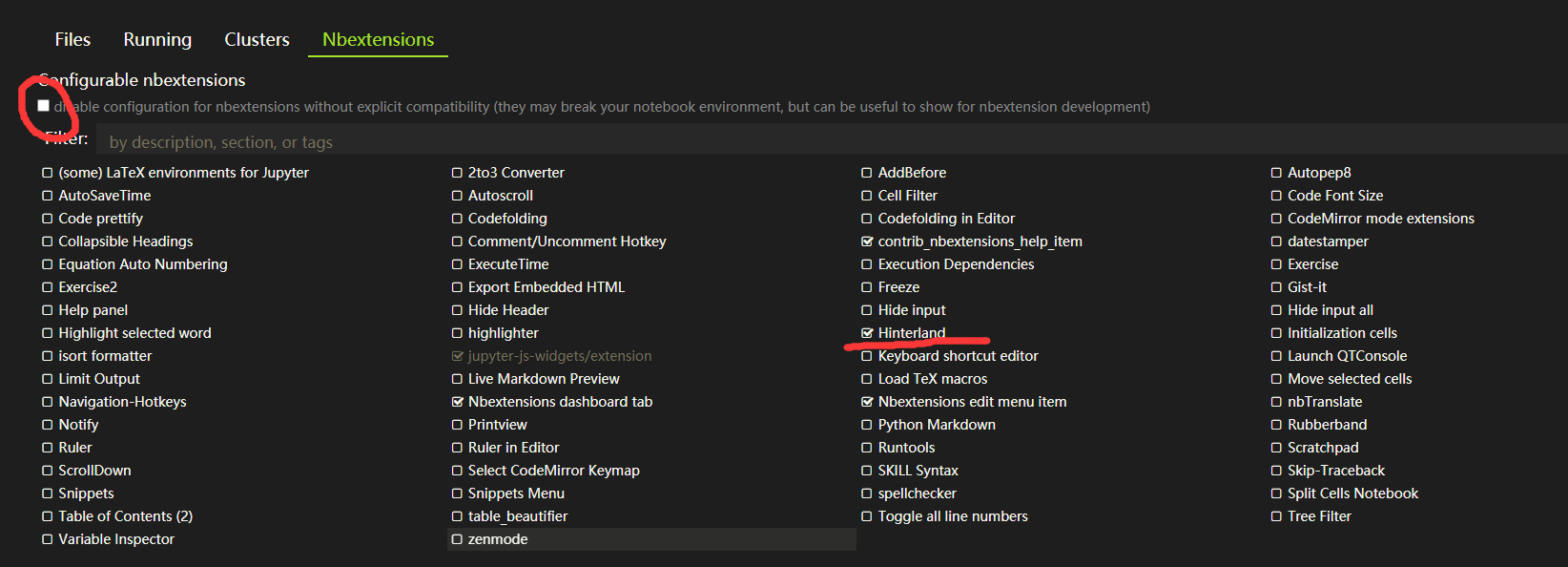
- 如果没出现,或是出现别的内容,继续在anaconda prompt运行以下内容
-
jupyter contrib nbextension install --user --skip-running-check程序更新后重新打开notebook,重复步骤2.
-
参考链接:jupyter notebook入门——自动补全代码
最后
以上就是帅气香菇最近收集整理的关于Jupyter Notebook设置代码自动补全的全部内容,更多相关Jupyter内容请搜索靠谱客的其他文章。
本图文内容来源于网友提供,作为学习参考使用,或来自网络收集整理,版权属于原作者所有。








发表评论 取消回复