一、项目背景说明:
本项目使用react脚手架npx create-react-app my-app工具直接构建,请求接口方式使用的是axios。
二、 具体操作步骤
- http-proxy-middleware
npm install http-proxy-middleware
- src文件下创建一个 setupProxy.js文件
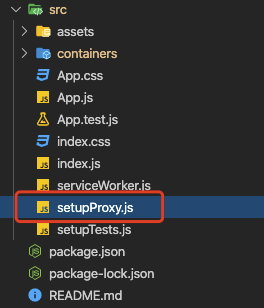
- setupProxy.js手动配置
const targetOne = 'http://172.24.41.37:9090';
const targetTwo = 'http://172.25.142.21:9090';

const { createProxyMiddleware } = require('http-proxy-middleware');

module.exports = function(app) {
  app.use(
    createProxyMiddleware('/blog',{ target:targetOne })
  );
  app.use(
    createProxyMiddleware('/api',{ target:targetTwo })
  );
};
- 接口请求的写法
    getReply = () => {
        axios.get("/blog/message/topiclist").then(response => {
            if(response.status === 200){
                this.setState({
                    messagesData: response.data,
                })
            }
        })
    }
备注:
如果不成功可以先确认一下电脑上是否安装了nginx

最后
以上就是细心歌曲最近收集整理的关于react项目中接入Nginx反向代理实现跨域的全部内容,更多相关react项目中接入Nginx反向代理实现跨域内容请搜索靠谱客的其他文章。
本图文内容来源于网友提供,作为学习参考使用,或来自网络收集整理,版权属于原作者所有。








发表评论 取消回复