- wss://echo.websocket.org
这是国外一个专门用来测试 WebSocket 的网站,同样也支持在线测试----测试地址 websocket-test.com
正文开始
最近做这个扫码点餐来消息功能,。即时通讯(Instant Messaging)最重要的毫无疑问就是即时,不能有明显的延迟,要实现IM的功能其实并不难,目前有很多第三方,比如极光的JMessage,都比较容易实现。但是如果项目有特殊要求(如不能使用外网),那就得自己做了,所以我们需要使用WebSocket
WebSocket
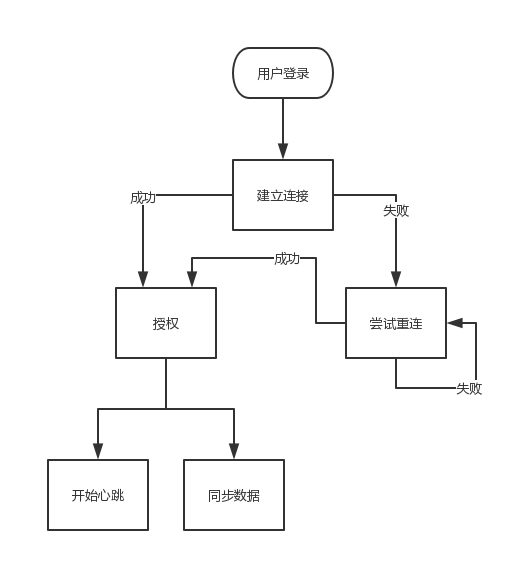
简而言之,它就是一个可以建立长连接的全双工(full-duplex)通信协议,允许服务器端主动发送信息给客户端。
1.首先需要在AndroidManifest.xml中开启一个服务:
<!-- 后台服务-长连接 -->
<service android:name=".service.BackService" />
2.写一个类BackService继承Service:
public class BackService extends Service{
@Override
public void onCreate() {
super.onCreate();
}
@Nullable
@Override
public IBinder onBind(Intent intent) {
return null;
}
}
3.在BackService的onCreate()方法中开启一个线程:
@Override
public void onCreate() {
super.onCreate();
new InitSocketThread().start();
}
class InitSocketThread extends Thread {
@Override
public void run() {
super.run();
try {
initSocket();
} catch (UnknownHostException e) {
e.printStackTrace();
} catch (IOException e) {
e.printStackTrace();
}
}
}
/**
* 心跳检测时间
*/
private static final long HEART_BEAT_RATE = 15 * 1000;//每隔15秒进行一次对长连接的心跳检测
private static final String WEBSOCKET_HOST_AND_PORT = "ws://xxx:9501";//可替换为自己的主机名和端口号
private WebSocket mWebSocket;
// 初始化socket
private void initSocket() throws UnknownHostException, IOException {
OkHttpClient client = new OkHttpClient.Builder().readTimeout(0, TimeUnit.MILLISECONDS).build();
Request request = new Request.Builder().url(WEBSOCKET_HOST_AND_PORT).build();
client.newWebSocket(request, new WebSocketListener() {
@Override
public void onOpen(WebSocket webSocket, Response response) {//开启长连接成功的回调
super.onOpen(webSocket, response);
mWebSocket = webSocket;
}
@Override
public void onMessage(WebSocket webSocket, String text) {//接收消息的回调
super.onMessage(webSocket, text);
//收到服务器端传过来的消息text
}
@Override
public void onMessage(WebSocket webSocket, ByteString bytes) {
super.onMessage(webSocket, bytes);
}
@Override
public void onClosing(WebSocket webSocket, int code, String reason) {
super.onClosing(webSocket, code, reason);
}
@Override
public void onClosed(WebSocket webSocket, int code, String reason) {
super.onClosed(webSocket, code, reason);
}
@Override
public void onFailure(WebSocket webSocket, Throwable t, @Nullable Response response) {//长连接连接失败的回调
super.onFailure(webSocket, t, response);
}
});
client.dispatcher().executorService().shutdown();
mHandler.postDelayed(heartBeatRunnable, HEART_BEAT_RATE);//开启心跳检测
}
4.开启心跳检测:
private long sendTime = 0L;
// 发送心跳包
private Handler mHandler = new Handler();
private Runnable heartBeatRunnable = new Runnable() {
@Override
public void run() {
if (System.currentTimeMillis() - sendTime >= HEART_BEAT_RATE) {
boolean isSuccess = mWebSocket.send("");//发送一个空消息给服务器,通过发送消息的成功失败来判断长连接的连接状态
if (!isSuccess) {//长连接已断开
mHandler.removeCallbacks(heartBeatRunnable);
mWebSocket.cancel();//取消掉以前的长连接
new InitSocketThread().start();//创建一个新的连接
} else {//长连接处于连接状态
}
sendTime = System.currentTimeMillis();
}
mHandler.postDelayed(this, HEART_BEAT_RATE);//每隔一定的时间,对长连接进行一次心跳检测
}
};
5.当BackService关闭时,关闭掉长连接:
@Override
public void onDestroy() {
super.onDestroy();
if (mWebSocket != null) {
mWebSocket.close(1000, null);
}
}
以下是BackService完整代码
import android.app.Application;
import android.app.Service;
import android.content.Context;
import android.content.Intent;
import android.os.Handler;
import android.os.IBinder;
import android.support.annotation.Nullable;
import android.util.Log;

import com.alibaba.fastjson.JSON;
import com.alibaba.fastjson.JSONException;
import com.alibaba.fastjson.JSONObject;
import com.jydp.smdc.main.app.EventMainBack;
import com.jydp.smdc.main.app.TzApplication;
import com.jydp.smdc.main.fragment.takemoney.entity.EventTab1;
import com.jydp.smdc.main.fragment.takemoney.entity.EventTabBack;
import com.jydp.smdc.util.ISharedPreference;

import org.greenrobot.eventbus.EventBus;

import java.io.IOException;
import java.net.UnknownHostException;
import java.util.concurrent.TimeUnit;

import okhttp3.OkHttpClient;
import okhttp3.Request;
import okhttp3.Response;
import okhttp3.WebSocket;
import okhttp3.WebSocketListener;
import okio.ByteString;

/**
 */
public class BackService extends Service {

    public Application application;

    public Context context;
    @Nullable
    @Override
    public IBinder onBind(Intent intent) {
        return null;
    }
    private InitSocketThread thread;

    @Override
    public void onCreate() {
        super.onCreate();
        if (mWebSocket != null) {
            mWebSocket.close(1000, null);
        }
        new InitSocketThread().start();
        application= TzApplication.getInstance();//这个是application,需要在功能清单里面的--android:name=".main.app.TzApplication"
        context=TzApplication.getInstance();
        Log.e("TAG","onCreate------------*************-------------");
    }

    @Override
    public int onStartCommand(Intent intent, int flags, int startId) {
        return super.onStartCommand(intent, flags, startId);

    }

    /**
     * 心跳检测时间
     */
    private static final long HEART_BEAT_RATE = 10 * 1000;//每隔10秒进行一次对长连接的心跳检测


    private final String WEBSOCKET_HOST_AND_PORT = "这个是你的websocket的地址,可以是ws,也可以是wss";//可替换为自己的主机名和端口号
    private WebSocket mWebSocket;
    // 初始化socket

    private void initSocket() throws UnknownHostException, IOException {
        OkHttpClient client = new OkHttpClient.Builder().readTimeout(0, TimeUnit.MILLISECONDS).build();
        Request request = new Request.Builder().url(WEBSOCKET_HOST_AND_PORT).build();
        client.newWebSocket(request, new WebSocketListener() {
            @Override
            public void onOpen(WebSocket webSocket, Response response) {//开启长连接成功的回调
                super.onOpen(webSocket, response);
                mWebSocket = webSocket;
            }

            @Override
            public void onMessage(WebSocket webSocket, String text) {//接收消息的回调
                super.onMessage(webSocket, text);
                //收到服务器端传过来的消息text
                Log.e("TAG", "接收消息的回调--------------"+text);


                try {
                    //这个是解析你的回调数据
                    JSONObject jsonObject = JSON.parseObject(text);

                } catch (JSONException e) {
                    e.printStackTrace();
                }


            }

            @Override
            public void onMessage(WebSocket webSocket, ByteString bytes) {
                super.onMessage(webSocket, bytes);

            }

            @Override
            public void onClosing(WebSocket webSocket, int code, String reason) {
                super.onClosing(webSocket, code, reason);

            }

            @Override
            public void onClosed(WebSocket webSocket, int code, String reason) {
                super.onClosed(webSocket, code, reason);

            }

            @Override
            public void onFailure(WebSocket webSocket, Throwable t, @Nullable Response response) {//长连接连接失败的回调
                super.onFailure(webSocket, t, response);


            }
        });
        client.dispatcher().executorService().shutdown();
        mHandler.postDelayed(heartBeatRunnable, HEART_BEAT_RATE);//开启心跳检测
    }


    class InitSocketThread extends Thread {
        @Override
        public void run() {
            super.run();
            try {
                initSocket();
            } catch (UnknownHostException e) {
                e.printStackTrace();
            } catch (IOException e) {
                e.printStackTrace();
            }
        }
    }

    private long sendTime = 0L;
    // 发送心跳包
    private Handler mHandler = new Handler();
    private Runnable heartBeatRunnable = new Runnable() {
        @Override
        public void run() {
            if (System.currentTimeMillis() - sendTime >= HEART_BEAT_RATE) {
                if(mWebSocket!=null) {
                    boolean isSuccess = mWebSocket.send("这个是发给后台服务器的消息,根据要求自定义");//发送一个消息给服务器,通过发送消息的成功失败来判断长连接的连接状态
                    if (!isSuccess) {//长连接已断开,
                        Log.e("TAG", "发送心跳包-------------长连接已断开");
                        mHandler.removeCallbacks(heartBeatRunnable);
                        mWebSocket.cancel();//取消掉以前的长连接
                        new InitSocketThread().start();//创建一个新的连接
                    } else {//长连接处于连接状态---
                        Log.e("TAG", "发送心跳包-------------长连接处于连接状态");
                    }
                }

                sendTime = System.currentTimeMillis();
            }
            mHandler.postDelayed(this, HEART_BEAT_RATE);//每隔一定的时间,对长连接进行一次心跳检测
        }
    };
    //关闭长连接
    @Override
    public void onDestroy() {
        super.onDestroy();
        if (mWebSocket != null) {
            mWebSocket.close(1000, null);
        }
    }

}
//在你想要长连接的地方连接
public class MainActivity extends BaseActivity {
@Override
protected Activity getChildActivity() {
return this;
}
@Override
protected int getLayoutId() {
return R.layout.activity_main;
}
@Override
protected void onCreate(Bundle savedInstanceState) {
super.onCreate(savedInstanceState);
//开启长连接
startService();
}
private void startService() {
Intent intent1 = new Intent(MainActivity.this, BackService.class);
stopService(intent1);
Log.e("TAG", "stop----");
Intent intent2 = new Intent(MainActivity.this, BackService.class);
startService(intent2);
}
}
添加权限<uses-permission android:name="android.permission.INTERNET"></uses-permission>
添加在build.gradle
implementation 'com.squareup.okhttp3:okhttp:3.5.0'
implementation files('libs/fastjson-1.1.45.jar')
libs中
fastjson-1.1.45.jar
参考博主的
Android通过WebSocket建立一个长连接(带心跳检测)从服务器端接收消息_u010257931的博客-CSDN博客_android websocket长连接
最后
以上就是简单机器猫最近收集整理的关于android接入简单的websocket步骤,建立一个长连接(带心跳检测)从服务器端接收消息的全部内容,更多相关android接入简单内容请搜索靠谱客的其他文章。








发表评论 取消回复