触发器
作用:决定何时,触发窗口计算函数,开始计算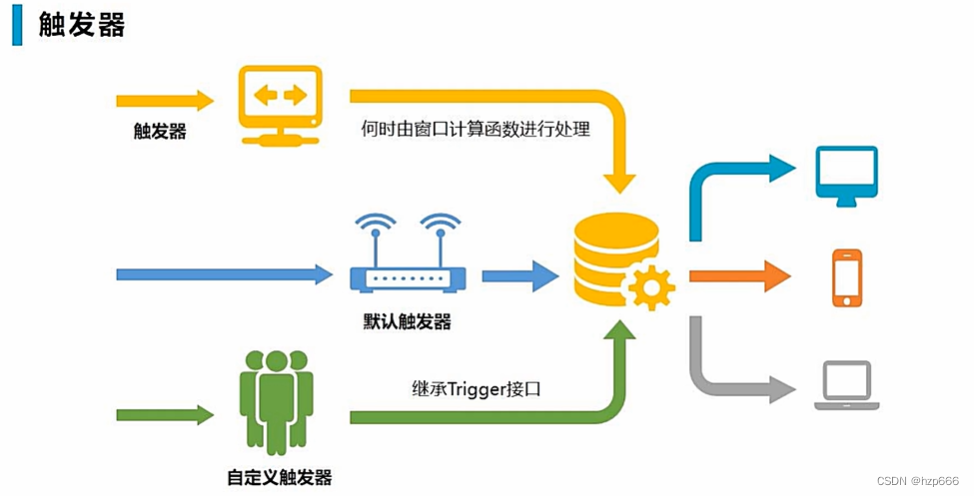
每个窗口都有一个默认触发器,也可以自定义触发器。
自定义触发器
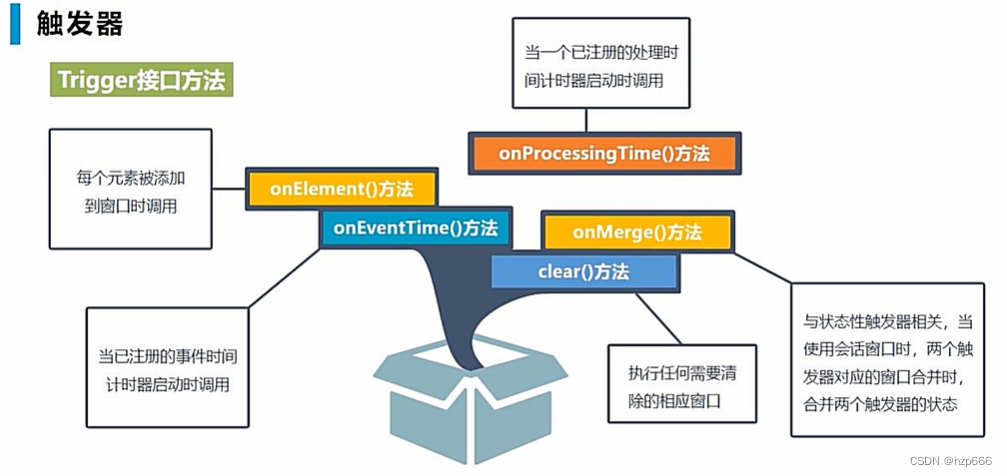
示例1:
当流中元素达到5个以后,触发窗口计算。
import org.apache.flink.api.common.functions.ReduceFunction
import org.apache.flink.api.common.serialization.SimpleStringSchema
import org.apache.flink.api.common.state.ReducingStateDescriptor
import org.apache.flink.api.scala.createTypeInformation
import org.apache.flink.streaming.api.TimeCharacteristic
import org.apache.flink.streaming.api.scala.StreamExecutionEnvironment
import org.apache.flink.streaming.api.windowing.time.Time
import org.apache.flink.streaming.api.windowing.triggers.{Trigger, TriggerResult}
import org.apache.flink.streaming.api.windowing.windows.TimeWindow
import org.apache.flink.streaming.connectors.kafka.FlinkKafkaConsumer

import java.util.Properties

//case class StockPrice(stockId:String, timestamp: Long, price:Double)
//defined the dataSource's type
case class StockPrice(stockId:String, timeStamp:Long, price:Double)

object trigger {

  def main(args: Array[String]): Unit = {

    //create env
    val env = StreamExecutionEnvironment.getExecutionEnvironment

    //set parallelism
    env.setParallelism(1)

    //set process time
    env.setStreamTimeCharacteristic(TimeCharacteristic.ProcessingTime)

        //for kafka connection
        val kafkaProps = new Properties()

        //kafka's attribute
        kafkaProps.setProperty("bootstrap.servers","10.10.10.162:9092")

        //set the consumer's group
        kafkaProps.setProperty("group.id","gksk-bigdata")

        //create the consumer
        val kafkaSource = new FlinkKafkaConsumer[String]("stockPrice", new SimpleStringSchema, kafkaProps)

        //set offset
        kafkaSource.setStartFromEarliest()

        //auto commit offset
        kafkaSource.setCommitOffsetsOnCheckpoints(true)

        //band data source
        val ds = env.addSource(kafkaSource)

        val stockPriceStream = ds.map(s => s.split(","))
          .map(s => StockPrice(s(0).toString, s(1).toLong, s(2).toDouble))

//    //create ds
//    val pricesList = List(StockPrice("stock1", 10, 1), StockPrice("stock1", 11, 2), StockPrice("stock2", 10, 666), StockPrice("stock3", 10, 888.23), StockPrice("stock3", 10, 888.23))
//
//    val ds = env.fromCollection(pricesList)
//    //    ds.print()


    val sumedStream = stockPriceStream.keyBy(s => s.stockId)
      .timeWindow(Time.seconds(10))
      .trigger(new MyTrigger(5))
      .reduce((s1, s2) => StockPrice(s1.stockId, s1.timeStamp, s1.price + s2.price))

    sumedStream.print()

    env.execute()

  }


  class MyTrigger extends Trigger[StockPrice, TimeWindow] {

    //to receive the para
    def this(maxCount:Int){
      this()
      this.maxCount = maxCount
    }

    //declare ( if reach max num ,then trigger windows)
    private var maxCount:Long = _

    //get trigger's state
    private lazy val countStateDescriptor = new ReducingStateDescriptor[Long]("count", new Sum, classOf[Long])

    //override on element
    override def onElement(t: StockPrice, l: Long, w: TimeWindow, triggerContext: Trigger.TriggerContext): TriggerResult = {

      //get the trigger's state
      val countState = triggerContext.getPartitionedState(countStateDescriptor)

      //state add
      countState.add(1L)

      //judge state more than max trigger num
      if(countState.get() >= this.maxCount){

        //reach max num,then clear and trigger window compute
        //clear state
        countState.clear()

        //compute
        TriggerResult.FIRE

      }else{
        TriggerResult.CONTINUE
      }
    }

    override def onProcessingTime(l: Long, w: TimeWindow, triggerContext: Trigger.TriggerContext): TriggerResult = {
      //do nothing, cause we don't need deal process Time window, but need to override func
      TriggerResult.CONTINUE
    }

    override def onEventTime(l: Long, w: TimeWindow, triggerContext: Trigger.TriggerContext): TriggerResult = {
      //do nothing
      TriggerResult.CONTINUE
    }

    //clear the state, when window reach max num to trigger the compute
    override def clear(w: TimeWindow, triggerContext: Trigger.TriggerContext): Unit = {
      println("@--now, window is closeed")
      triggerContext.getPartitionedState(countStateDescriptor).clear()
    }

    //update the state,
    class Sum extends ReduceFunction[Long]{
      override def reduce(t: Long, t1: Long): Long = {
        t+t1
      }
    }
  }


}
最后
以上就是辛勤鸭子最近收集整理的关于Flink学习26:触发器触发器自定义触发器的全部内容,更多相关Flink学习26内容请搜索靠谱客的其他文章。
本图文内容来源于网友提供,作为学习参考使用,或来自网络收集整理,版权属于原作者所有。

![[Flink]Flink1.3 Stream指南五 窗口触发器与驱逐器](https://www.shuijiaxian.com/files_image/reation/bcimg21.png)






发表评论 取消回复