一个 if 语句和一个布尔表达式后跟一个或多个语句,由 end 语句分隔,就是一个 if ... end 语句
MATLAB if 语句语法
在MATLAB中 的 if 语句的语法是:
if <expression>% statement(s) will execute if the boolean expression is true<statements>end
表达式的计算结果如果是“true”,那么在代码块中,如果语句会被执行。如果表达式计算结果为“false”,那么第一套代码结束后的语句会被执行。
MATLAB if 语句流程图:
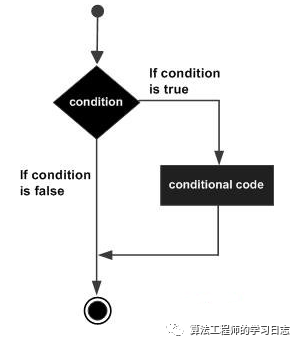
详细例子如下:
在MATLAB中建立一个脚本文件,并输入下述代码:
a = 10;% check the condition using if statementif a < 20% if condition is true then print the followingfprintf('a is less than 20' );endfprintf('value of a is : %d', a);
运行该文件,显示下述结果:
a is less than 20value of a is : 10
在MATLAB的 if...else...end 语句中,if 语句后面可以跟一个可选择的 else 语句,当执行的表达式为假的时候,执行 else 语句。
if...else...end 语句语法:
MATLAB 中一个 if ... else 语句的语法示例:
if <expression>% statement(s) will execute if the boolean expression is true<statement(s)>else<statement(s)>% statement(s) will execute if the boolean expression is falseend
如果布尔表达式的值为 “true”,那么执行 if 的代码块;如果布尔表达式的值为 “false”,else 的代码块将被执行。
if...else...end 语句流程图:
详细例子如下:
在MATLAB中建立一个脚本文件,并输入下述的代码:
a = 100;% check the boolean conditionif a < 20% if condition is true then print the followingfprintf('a is less than 20' );else% if condition is false then print the followingfprintf('a is not less than 20' );endfprintf('value of a is : %d', a);
编译和执行上述代码,产生下述结果:
a is not less than 20value of a is : 100
if...elseif...elseif...else...end 语句语法:
MATLAB 的 if...elseif...elseif...else...end 语句中 if 语句可以跟随一个(或多个)可选的 elseif... else 语句,这是非常有用的,可以用来对各种条件进行测试。
使用 if... elseif...elseif...else 语句,要注意以下几点:
-
一个 if 可以有零个或多个 else,但是它必须跟在 elseif 后面(即只有 elseif 存在才会有 else)。
-
一个 if 可以有零个或多个 elseif ,必须出现else。
-
一旦 elseif 匹配成功,余下的 elseif 将不会被测试。
if... elseif...else...end 语法:
if <expression 1>% Executes when the expression 1 is true<statement(s)>elseif <expression 2>% Executes when the boolean expression 2 is true<statement(s)>Elseif <expression 3>% Executes when the boolean expression 3 is true<statement(s)>else% executes when the none of the above condition is true<statement(s)>end
详细例子如下:
在MATLAB中建立一个脚本文件,并输入下述代码:
a = 100;%check the boolean conditionif a == 10% if condition is true then print the followingfprintf('Value of a is 10' );elseif( a == 20 )% if else if condition is truefprintf('Value of a is 20' );elseif a == 30% if else if condition is truefprintf('Value of a is 30' );else% if none of the conditions is true 'fprintf('None of the values are matching');endfprintf('Exact value of a is: %d', a );
编译和执行上述代码,产生如下结果:
None of the values are matchingExact value of a is: 100
最后
以上就是简单小蚂蚁最近收集整理的关于MATLAB-判断语句if...else...end的全部内容,更多相关MATLAB-判断语句if内容请搜索靠谱客的其他文章。








发表评论 取消回复