第一步:开始菜单 Anaconda目录下,打开 Anaconda Prompt (Anaconda3)
第二步:输入
pip install jupyter_contrib_nbextensions -i https://pypi.tuna.tsinghua.edu.cn/simple/第三步:输入
jupyter contrib nbextension install --user第四步:
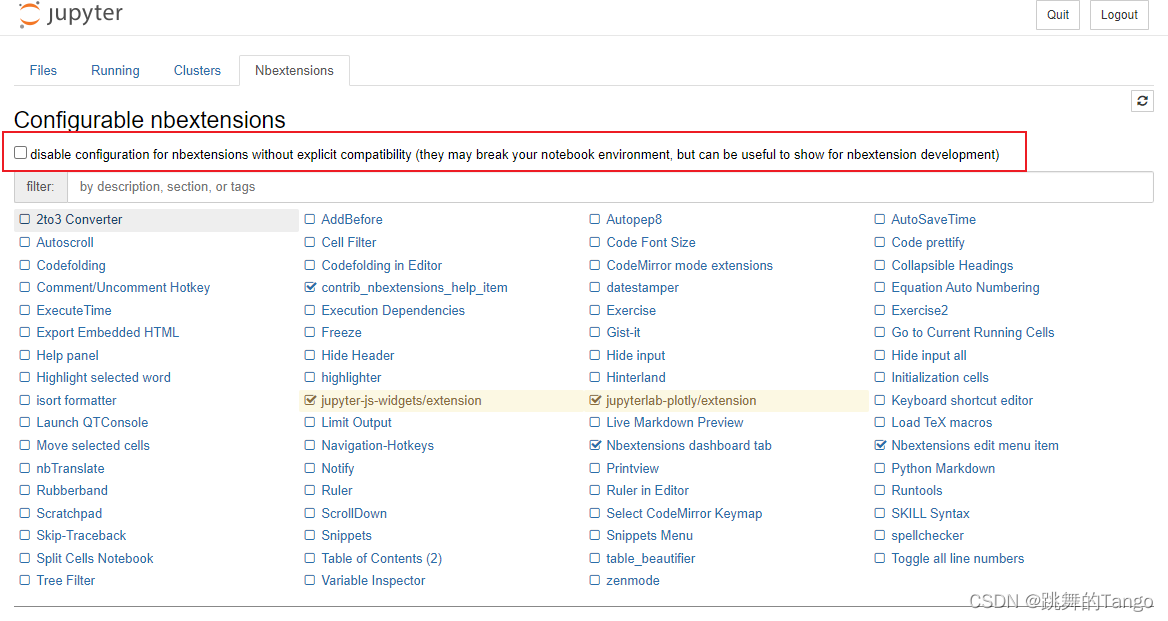
重新启动Jupyter Notebook,可以看到插件的Tab签
将方框内的√去掉,然后勾选Table of Contents(2)
最后
以上就是清爽啤酒最近收集整理的关于Jupyter Notebook 添加目录插件的全部内容,更多相关Jupyter内容请搜索靠谱客的其他文章。
本图文内容来源于网友提供,作为学习参考使用,或来自网络收集整理,版权属于原作者所有。








发表评论 取消回复