我是靠谱客的博主 快乐芒果,这篇文章主要介绍clientHeight、offsetHeight、scrollHeight、scrollTop的区别以及上拉加载的实现,现在分享给大家,希望可以做个参考。
clientHeight、offsetHeight、scrollHeight、scrollTop的介绍
在前端的项目中,为了提高性能经常会使用到上拉加载,clientHeight、offsetHeight、scrollHeight、scrollTop是实现上拉 加载的关键。所以,首先来介绍下三者的意义以及区别。
clientHeight:表示的是当前显示的元素的高度,如果存在X轴的滚动条与根元素边框,不包括X轴的滚动条与根元素边框的高度 。
offsetHeight:也表示的是当前显示元素的高度,与clientHeight类似,但offsetHeight包括X轴的滚动条与根元素边框的高度。
scrollHeight:表示内容区域的整个高度,包括溢出的内容区域,即滚动条的 高度。
scrollTop:表示的是滚动条滚动的高度,初始未滚动时的高度为0。
具体如下图所示:
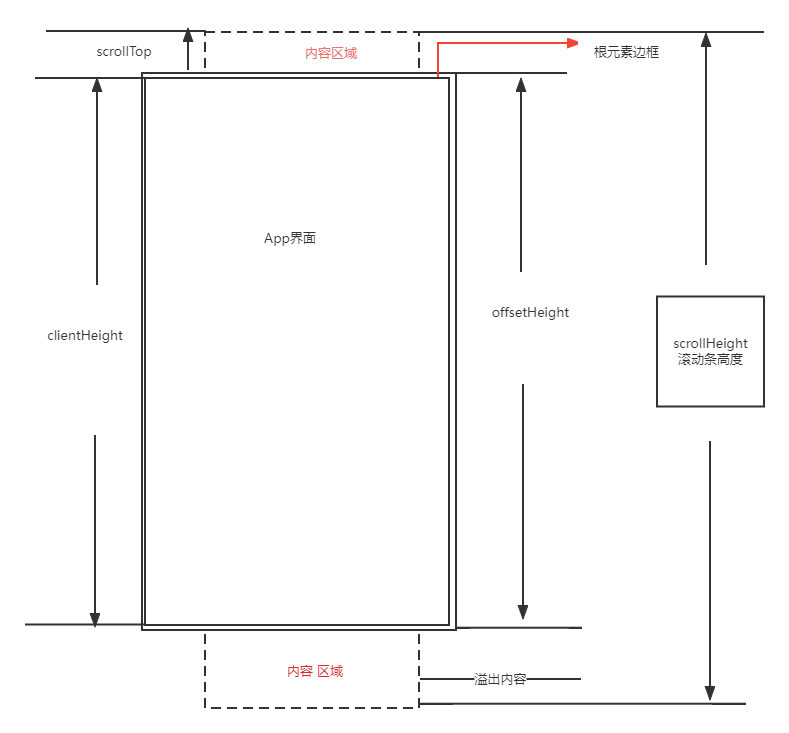
有上图可知:offsetHeight+scrollTop>=scrollHeight时,代表滚动条滑动了底部。
上拉加载的实现
有上可知,当滚动条滑动到底部时,即offsetHeight+scrollTop>=scrollHeight时,我们可以加载新的内容 ,从而实现上拉加载。因此,我们需要监听滚动条的变化。可以使用 onScroll(e)方法进行监听,其中参数e中包含了滚动条的各种信息。我这里使用vue提供的一种@scroll进行滚动条的监听。
<template>
  <div id="app" @scroll="handkeScroll">
    <div>ghg</div>
    <div>gfhd</div>
    <div>ghd</div>
    <div>gfhd</div>
    <div>gfdhd</div>
    <div>dgfhd</div>
    <div>dhgd</div>
    <div>dhgd</div>
    <div>dhgfdh</div>
    <div>dhgd</div>
    <div>dfhgdgh</div>
    <div>fdghdhg</div>
    <div>fgdhd</div>
    <div>dgggf</div>
    <div>gfdhg</div>
    <div>gfhdhgf</div>
    <div>ghfgdf</div>
    <div>fghdh</div>
    <div>gdhdh</div>
    <div>gfhdh</div>
  </div>
</template>

<script>

export default {
  name: 'App',
 methods:{
   handkeScroll(e){
     console.log(e);
     let offsetHeight =  e.srcElement.offsetHeight;
     let scrollTop = e.srcElement.scrollTop;
     let scrollHeight = e.srcElement.scrollHeight;
     console.log(offsetHeight,scrollTop,scrollHeight);
     if(offsetHeight+scrollTop>=scrollHeight){
       //滚轮到底,可以进行内容加载
      //进行内容添加的操作即可
     }
   }
 },
}
</script>

<style lang="scss">
#app{
  height: 100%;
  width: 100%;
  overflow-y: scroll;
  & div:nth-child(2n){

     height: 200px;
    width: 100%;
  }
  & div:nth-child(2n+1){
     height: 200px;
    width: 100%;
  }
}
</style>
最后
以上就是快乐芒果最近收集整理的关于clientHeight、offsetHeight、scrollHeight、scrollTop的区别以及上拉加载的实现的全部内容,更多相关clientHeight、offsetHeight、scrollHeight、scrollTop内容请搜索靠谱客的其他文章。
本图文内容来源于网友提供,作为学习参考使用,或来自网络收集整理,版权属于原作者所有。








发表评论 取消回复