Step 0 下载安装包
将压缩包拷贝至某一路径下,
解压缩
unzip SeetaFaceEngine-master.zipStep 1 安装SeetaFace Detection
cd FaceDetection/
mkdir build
cd build/
cmake ..
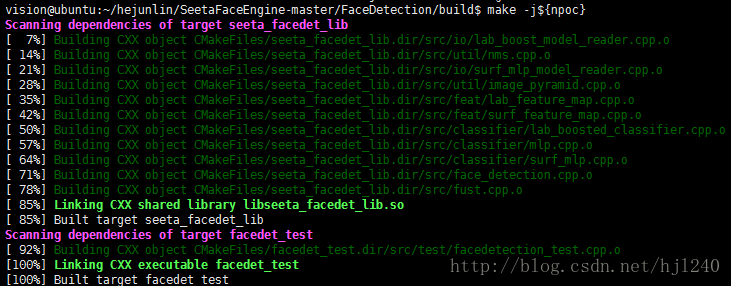
make -j${nproc}
Step 2 安装SeetaFace Alignment
进入FaceAlignment目录中
mkdir build
cd build/
然后将FaceDetection中的/include/face_detection.h和/build/libseeta_facedet_lib.so 拷贝到/FaceAlignment/build文件夹下
cp ../../FaceDetection/include/face_detection.h .
cp ../../FaceDetection/build/libseeta_facedet_lib.so .
cmake ..
make
make过程中若出现如下错误,
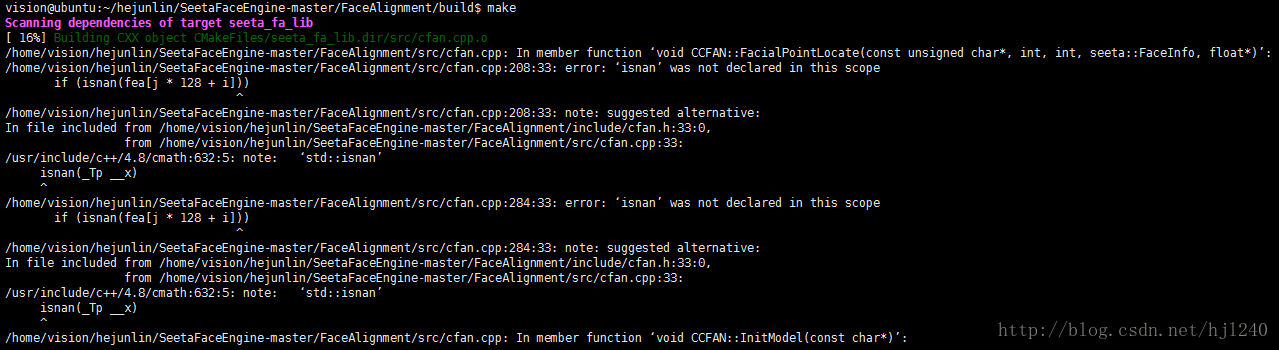
在FaceAlignment/src/cfan.cpp中添加
using std::isnan;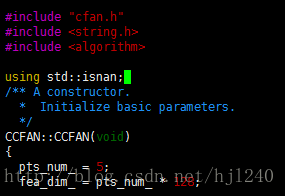
重新回到build目录中,
makeStep 3 安装SeetaFace Indentification
进入SeetaFace Indentification文件夹下
mkdir build
cd build
cmake .. && make
参考文章:
http://blog.csdn.net/u012336567/article/details/52746024
最后
以上就是义气草莓最近收集整理的关于SeetaFace在linux下安装配置的全部内容,更多相关SeetaFace在linux下安装配置内容请搜索靠谱客的其他文章。
本图文内容来源于网友提供,作为学习参考使用,或来自网络收集整理,版权属于原作者所有。








发表评论 取消回复