参数传递
示例一
- 修改
index.js
// ...
export default new Router({
  routes: [
    {
      path: '/main',
      name: 'Main',
      component: Main,
      children: [
        {path: '/user/profile/:id', name: 'UserProfile', component: UserProfile},
        {path: '/user/list', name: UserList, component: UserList}
      ]
    }
  ]
})
- 修改
Main.vue
<router-link :to="{name:'UserProfile',params:{id: 1}}">个人信息</router-link>
- 修改
Profile.vue
所有的元素在使用时必须放在标签内
<template>
  <div style="float: left;">
    <h1>个人信息</h1>
    <h1>{{$route.params.id}}</h1>
  </div>
</template>
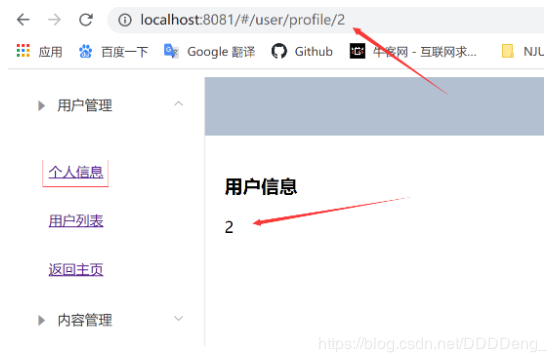
- 效果图
示例二
props解耦
- 修改
Profile.vue
<script>
  export default {
    props: ['id'],
    name: "UserProfile"
  }
</script>
- 修改
index.js
export default new Router({
  routes: [
    {
      path: '/main',
      name: 'Main',
      component: Main,
      children: [
      	//修改了这里
        {path: '/user/profile/:id', name: 'UserProfile', component: UserProfile, props: true},
        {path: '/user/list', name: UserList, component: UserList}
      ]
    }
  ]
})
示例三
登录用户之后,在main页面右上角显示用户名
- 修改
Login.vue
    methods: {
      onSubmit(formName) {
        // 为表单绑定验证功能
        this.$refs[formName].validate((valid) => {
          if (valid) {
            // 在这里添加参数
            this.$router.push("/main/"+this.form.username);
          } else {
            this.dialogVisible = true;
            return false;
          }
        });
      }
    }
- 修改
index.js
  routes: [
    {
      path: '/main/:name',
      name: 'Main',
      component: Main,
      children: [
        {path: '/user/profile/:id', name: 'UserProfile', component: UserProfile, props: true},
        {path: '/user/list', name: UserList, component: UserList}
      ],
      props: true
    }
- 修改
Main.vue
        <el-header style="text-align: right; font-size: 12px">
          <!--...-->
          <span>{{name}}</span>
        </el-header>
<script>
  export default {
    props: ['name'],
    name: "Main"
  }
</script>
最后
以上就是自然鞋子最近收集整理的关于16. Vue.js参数传递参数传递的全部内容,更多相关16.内容请搜索靠谱客的其他文章。
本图文内容来源于网友提供,作为学习参考使用,或来自网络收集整理,版权属于原作者所有。








发表评论 取消回复